

This is a long pending post, should have posted long back. I was preoccupied with my office work and some personal affairs. Sorry for not being able to reply all your comments and mails.
Enable “Read More” Feature in wordpress
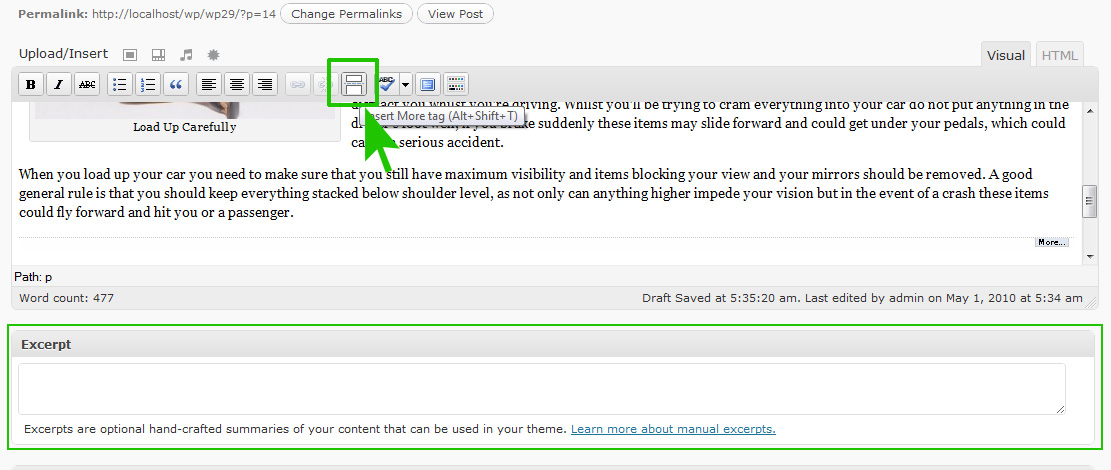
Many of you have been requesting feature to post only “excerpts” or “summaries” of your post on front page or category or archive pages. But we already have that feature in WordPress text editor, a button called “Incert More tag (alt+shift+t)”. Place your cursor at the end of the line where you want the “Read more” link and press the “Incert More tag” button, which will end your post at the point of your cursor with a “Read More” link, or whatever the text is defined in theme.
But as Dr. G requested for custom excerpts, Means instead of using few lines of the post as intro, he want to be able to use a custom written summery of the post. For that I will have to add a theme option, which will enable the “Excerpt” (if you have written one in your post edit page, see the image), and replace the actual post from front page. I will try to add this option in future versions or any new theme release.
How To Change The Hyperlink Text Decoration
Another common request I have been receiving is “How to change link color” or “How to add underline”
Just add the following code at the end of style.css
div.postwrap div.postcontent a,

div.postwrap div.postcontent a:visited {

text-decoration: underline; /* For text-decoration, other values can be: blink, line-through, none, overline */

color: #3399FF; /* For hyperlink color, you can use http://www.colorpicker.com/ to choose color values */

}
Remember, you do not need the line “text-decoration : underline;” in idream, because it already has underlined link. And this will change hyperlinks in your post content only.
no, you don’t need to go through the chores of having to manually add “read more” division into your post.
All you need is this handy plugin and it will automatically do it for you!
http://wordpress.org/extend/plugins/wp-limit-posts-automatically/
Hi, I think this is a great theme for a freebie! Keep up the good work.
Regards.
Ian
Hi, me again. I am sure your theme will become very popular. Are you considering having a forum for it? I have several questions I’d like to ask. Thanks, Ian
Hi Ian, Sure will start a forum, but before that i am thinking of releasing few more wordpress themes.
The css you posted to change the color of URLs gives a double underline. I turned off the text-decoration: underline so at least I only have the gray underline…
for iDream you will have to add another line at bottom like
border-bottom:none;to remove the grey border which looks like underlinethe CSS class will look like
div.postwrap div.postcontent a,

div.postwrap div.postcontent a:visited {

text-decoration: underline;

color: #3399FF;

border-bottom:0px none;

}
THANKS A LOT, marsian! Very helpful.
(And actually the existing “more-fubction” is exactly what I was looking for when I was referring to “excerpt”.
Have a great day,
Gerrit
Thanks for the great theme. I made a few changes, myself, such as getting rid of the gray link underlines in posts, because they didn’t look right when an inage was a link. Also, with an image as a link, and the line disappearing when hovered, it caused everything under the photo on the page to jump 1 line. I used your CSS code above and left the single underline in place.
Also, I fixed the main background image in place, because I think it adds more depth to the page when it’s visible. For anyone who also wants to do this, just add the following line under the {body section:
background-attachment:fixed
Hello,
I am using your theme for my blog and I like it very much. Thank you.
My question is regarding the [search]. It does not work on my site and I am not sure how to fix it (I know nothing about PHP). So, can you please advise how to remove it from the pages ?…
Also, do you have a tip on how I can split the comments (not the posts) on my blog ?… (see http://www.retireoption.com/destinations)..
Thank you for your help and advice, greatly appreciated !…